Track visitors to Marketo landing pages from multiple sources

Tracking the sources of campaign activity from a landing page can provide valuable insight into traffic from sources such as social. Typically, the solution for this is to create multiple landing pages, one for each source; LinkedIn, Twitter etc.
Like Google Analytics, it is possible to record information via URL parameters. A similar approach can be used for Marketo with just a single landing page. Apply a parameter on the end of a landing page URL before sharing. An example below uses the parameter of “?src=linkedin”.
Below are two ways of reporting on the traffic and associated form submissions generated by a landing page from various sources:
Smart Lists to identify visitors:
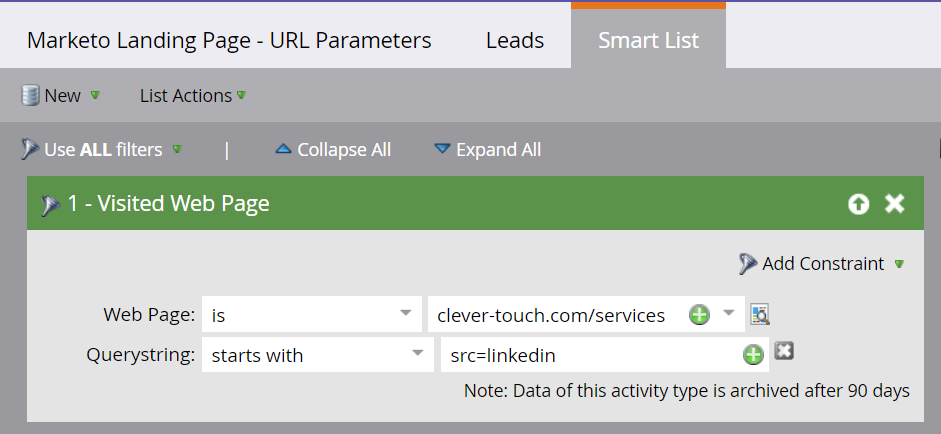
Smart Lists can identify every known record visiting a landing page. Through using ‘Constraints’ within ‘Filters’ it enables users to search on page views with certain parameters. Apply the filter ‘Visited Web Page’ along with the ‘Querystring’ constraint. A Smart List for each URL and parameter enables visibility and traffic performance on known record visits.
Identify form submissions with landing page source tracking:
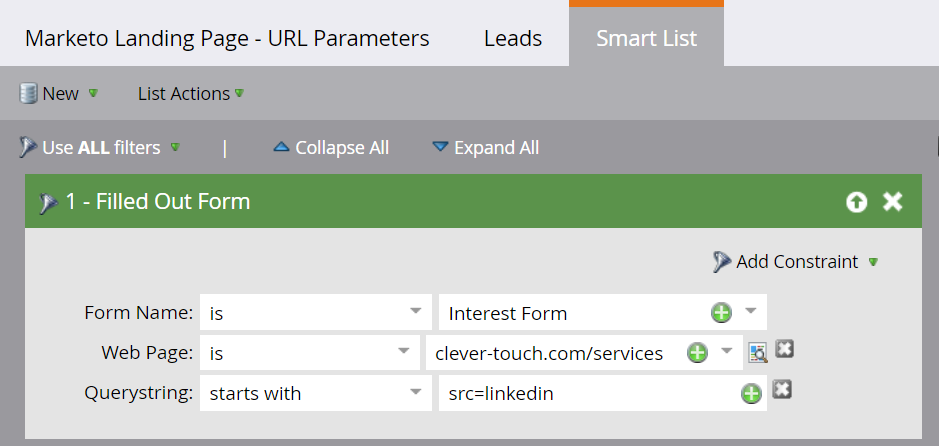
To track prospects or customers that have visited a landing page containing a URL parameter (source) and then submitted an associated form, use the ‘Filled out Form’ filter. This is a quick and easy way to identify who and how many people have submitted a form by a particular traffic source.

Built for marketing leaders looking at the bigger picture.
Let's build what's next


Trusted by 500+ organisations
worldwide