Copy and Paste in Pardot Engagement Studio

Have you ever built a complex Engagement Studio that had repetitive steps? Did you ever wish, “if only I could just copy and paste these sections?” – well, your wish has just come true!
In the Engagement Studio builder, you will notice two buttons at the top of the screen, a ‘Select’ and a ‘Copy’. If you hit ‘Select’ your steps will have an orange circle below them – select the steps you want to copy by clicking into the orange circles. To copy you just need to hit the ‘Copy’ button at the top, now all that’s left to do is paste! There is a new option to select when you press the ‘+’ in your studio ‘Copied Steps – Paste Xn steps from your clipboard’.
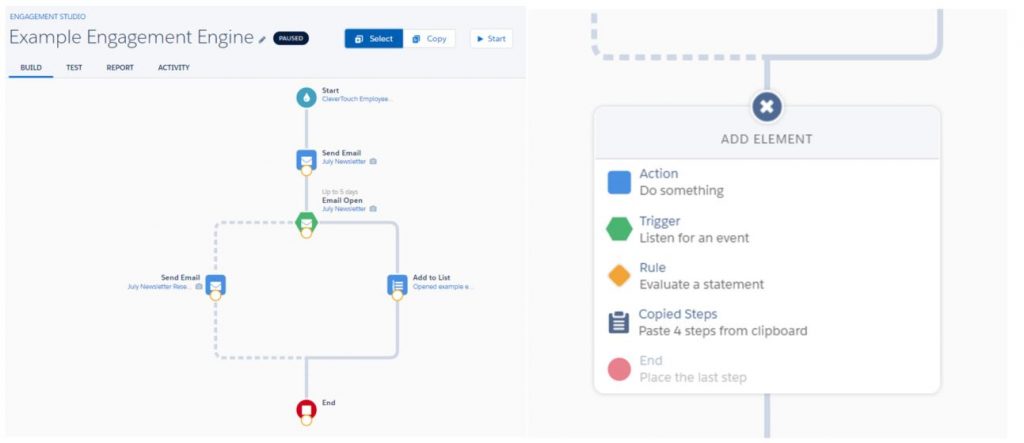
This is sure to excite many of you as it means you can copy multiple steps and paste them in seconds. Saving you minutes, hours – DAYS of your working life repeating the same build steps over and over. Along with the time saved building, you will also significantly reduce the amount of errors in your large engagement studios.
Reporting
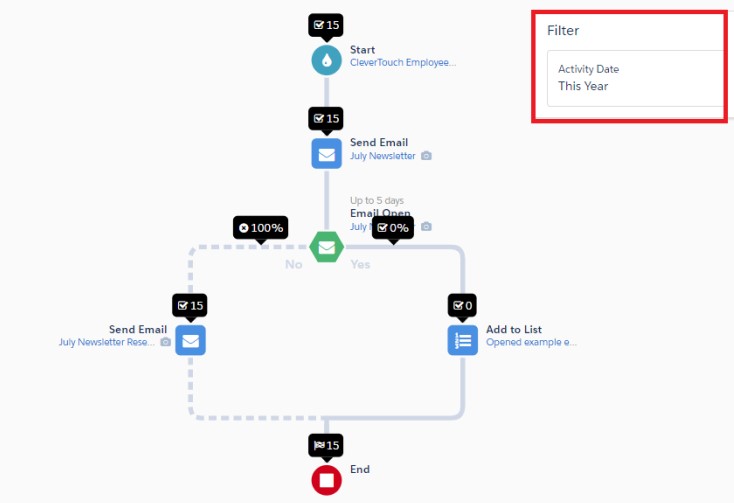
Reporting has also been improved in your Engagement Studio. We can now filter the reports by date, so we can see how well our studio has been performing within a specific date range.




Built for marketing leaders looking at the bigger picture.
Let's build what's next


Trusted by 500+ organisations
worldwide